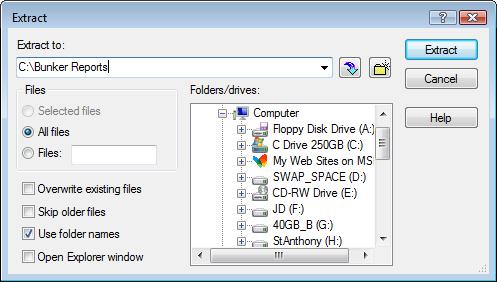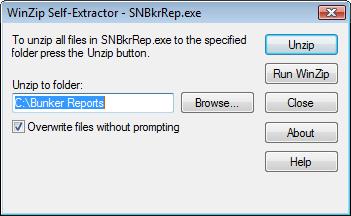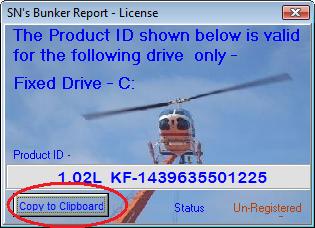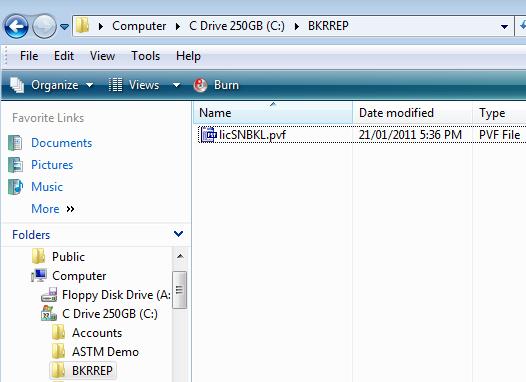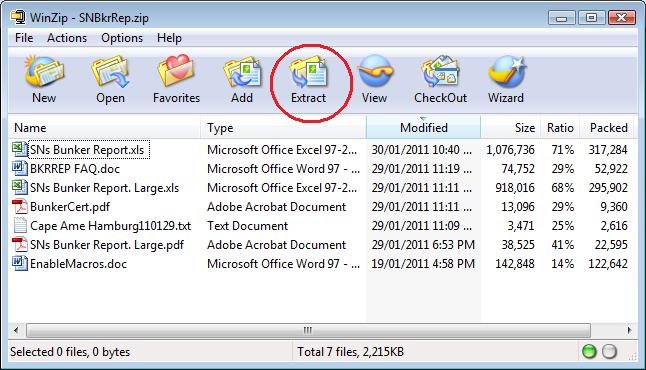
ÿþ<!DOCTYPE HTML PUBLIC "-//W3C//DTD HTML 3.2//EN"> <html> <head> <title>Crude Oil Or Product Tanker Cargo Calculations - Project Setting Up Instructions</title> <meta content="text/html; charset=unicode" http-equiv="Content-Type"> <meta name="GENERATOR" content="Microsoft FrontPage 5.0"> <meta name="description" content="SN's Goalseek Premium Add-in"> <meta name="description" content=" Project Setting Up Instructions,Crude Oil Product Tanker Cargo Calculations, hydrostatic calculation, Calculation Add-in"> <meta name="description" content="VEF Crude, Product Tanker, Cargo Calculations, oil calculation addins, work rest hours software, Best Place To Advertise, Where To Advertise, trim, stress, Goalseek"> <meta name="keywords" content="Bunker Reports, Crude, Product Tanker, Cargo Calculations, Vessel Experience Factor, shipping vehicles, solver, Where To Advertise, trim, stress"> <!-- Start Quantcast tag --> <script type="text/javascript" src="http://edge.quantserve.com/quant.js"></script> <script type="text/javascript">_qacct="p-c0ka3lonQZK5g";quantserve();</script> <!-- End Quantcast tag --><noscript></noscript> <meta name="verify-v1" content="wCx4cZ/s222Vkf0SdJXjHyfinOTuUVvehE0xoCGx0Ig="> <script type="text/javascript" src="http://ajax.googleapis.com/ajax/libs/jquery/1.3.2/jquery.min.js"></script> <script type="text/javascript" src="http://worldbiglove.com/imagemag.js"> </script> <script type="text/javascript"> var _gaq = _gaq || []; _gaq.push(['_setAccount', 'UA-7609137-2']); _gaq.push(['_trackPageview']); (function() { var ga = document.createElement('script'); ga.type = 'text/javascript'; ga.async = true; ga.src = ('https:' == document.location.protocol ? 'https://ssl' : 'http://www') + '.google-analytics.com/ga.js'; var s = document.getElementsByTagName('script')[0]; s.parentNode.insertBefore(ga, s); })(); </script> </head> <body bgcolor="#808080"> <script type="text/javascript" src="http://worldbiglove.com/wz_tooltip.js"></script> <p> <div align="center"> <center> <table cellspacing="0" cellpadding="0" width="780" border="5" bgcolor="#000000" bordercolor="#FF3300" style="border-collapse: collapse" height="1301"> <tbody> <tr> <td bgcolor="#000066" height="124"> <h1 align="center"><a href="http://cargocal.com"> <img border="0" src="http://cargocal.com/images/cargocallogo.jpg" align="left" alt="Cargocal.com - Customised Solutions For The Tanker Industry" width="123" height="124"></a><font color=#f4f4f4><a name="Top">Crude</a> Oil or Product Tanker Calculations</font></h1><font > <h2 align="center"> <font color="#800080" size=1><a href="http://link40.com/WattR.html"> <font color="#00FF00" face="Microsoft Sans Serif">The Grey Background is a Watt-Reduction Theme.&nbsp; Every milli-Watt counts.</font></a></font></h2> <p align="center"> <b><font color="#00cc66" size="2" face="Arial Narrow"><a onmouseover="Tip('Reduce, Reuse, Recycle <br> Rethink, Refuse, Restructure, Reorganise, Redesign, Repair, Retest <br> Reverse -> Sustain -> Tangible Improvement')" onmouseout=UnTip() href="http://link40.com/WattR.html"> <font color=#00FF00>Reduce....&gt;&gt;&nbsp; Reuse ...&gt;&gt;&nbsp;Recycle ...&gt;&gt;&nbsp;Rethink...&gt;&gt;&nbsp;Repair</font></a></font></b></font></td></tr> <tr> <td bgcolor="#f4f4f4" height="1176"> <table cellspacing="0" cellpadding="0" width="100%" align="center" border="0" height="733"> <tbody> <tr> <td width="150" valign="top" height="733"> <p> <table cellspacing="1" cellpadding="3" width="149" align="center" border=0 bgColor=#8080c0 style="WIDTH: 149px; HEIGHT: 3738"> <tr> <td bgcolor="#000066" height="50" style="font-family: Arial, sans-serif; font-size: 12px"> <p align="center"> <b><a href="http://cargocal.com/index.html"> <font face="Tahoma" size="2" color="#f4f4f4">Home</font></a></b></p> <p align="center"> <b><font face="Tahoma" size="2" color="#F4F4F4"> <a href="http://cargocal.com/sn's%20downloads.html"> <font color="#FFFFFF">Downloads</font></a></font></b><b style="font-family: Arial, sans-serif; font-size: 12px"><font color="#f4f4f4" face="Tahoma" size="2"> </font></b> </p> <p align="center"> <b><font face="Tahoma" size="2" color="#F4F4F4"> <a href="http://cargocal.com/oildefinitions.html"> <font color="#FFFFFF">Definitions</font></a></font></b></p> <p align="center"> <b><font face="Tahoma" size="2" color="#FFFFFF"> <a href="http://cargocal.com/surveydocumentation.html"> <font color="#FFFFFF">Survey Documentation</font></a></font></b></p></td> </tr> <tr> <td width="150" align="center" valign="top" height="1" style="font-family: Arial, sans-serif; font-size: 12px" bgcolor="#000066"> &nbsp;<p>&nbsp;</p> <p>&nbsp;<script type="text/javascript"><!-- google_ad_client = "pub-8491802827119857"; /* NewCCal125 */ google_ad_slot = "7767001574"; google_ad_width = 125; google_ad_height = 125; //--> </script> <script type="text/javascript" src="http://pagead2.googlesyndication.com/pagead/show_ads.js"> </script></p> <p>&nbsp;</p> <p> <font color="#0066cc" size="2" face="Tahoma"><a href="http://bigloveindia.com"> <font color=#FFFF00>Where to Advertise?</font></a></font><font face="Tahoma" color="#FFFF00" size="2"> </font> </p> <p><a href="http://worldbiglove.com"> <font color="#FFFF00" size="2" face="Tahoma">World Tourist Attractions</font></a></p> <p><font face="Tahoma" size="2" color="#0066CC"> <a href="http://link40.com"><font color="#FFFF00">Best Place To Advertise</font></a></font></p> <p> <font face="Tahoma" size="2" color="#0066CC"> <a href="http://bigloveindia.com/"><font color="#FFFF00">INDIA</font></a></font></p> <p> <a href="http://link40.com/Mar_Internet.html"> <font face="Tahoma" size="2" color="#FFFF00">Marine Internet</font></a></p> <p><a href="http://bigloveasia.com"> <font face="Tahoma" size="2" color="#FFFF00">Buy BigLoveAsia</font></a></p> <p><font color="#0000ff" size="2" face="Tahoma"><a href="http://conceptsforum.com/"><font color="#FFFF00">ConceptsForum.com</font></a></font><font color="#FFFF00" size="2" face="Tahoma">&nbsp; </font></p> <p><font color="#0066cc" size="2" face="Microsoft Sans Serif"><a href="http://worldbiglove.com/up.html"> <font color="#FFFF00" face="Tahoma" size="2">Universal Prayer</font></a></font></p> <p> <font color=#0066cc size="2" face="Microsoft Sans Serif"> <a href="http://link40.com/Med_VasRev.html"><img border="0" alt="Link40.com - Connecting The Top 40, A Directory Service" src="http://link40.com/images/vasrev1.jpg" width=113 height=113></a></font><font face="Tahoma" color="#FFFF00" size="2"> </td> </tr> <tr> <td width="150" height="2239" align="center" valign="top" bgcolor="#000066"> <p> <p>&nbsp;</p> <script type="text/javascript"><!-- google_ad_client = "pub-8491802827119857"; /* CargocalVertical1 */ google_ad_slot = "6568869800"; google_ad_width = 120; google_ad_height = 600; //--> </script> <script type="text/javascript" src="http://pagead2.googlesyndication.com/pagead/show_ads.js"> </script>&nbsp; </p> </td></tr></table> </td> <td width="640" bgcolor="#f4f4f4" VALIGN =top V v height="733"> <div align="center" style="width: 657; height: 722"> <center> <table cellspacing="6" cellpadding="0" width="657" border=0 style="border-collapse: collapse" bordercolor="#111111"> <tbody> <tr> <td align="left" style="float: left"> <div align="center"> <center> <table border="0" cellpadding="5" cellspacing="5" style="border-collapse: collapse" bordercolor="#111111" width="634" id="AutoNumber1" height="159"> <tr> <td width="293" height="110" valign="top"> <p dir="ltr"><b> <font face="Arial" size="4" color="#202020">Instructions for setting up the projects</font></b></p> <ol> <li dir="ltr"> <p dir="ltr" align="justify"> <font face="Arial" size="2" color="#202020">Download the desired zip or EXE file from the downloads page.&nbsp; (Save the Zip or EXE file to a folder of your choice)</font></p> <ul> <li dir="ltr"> <p dir="ltr" align="justify"> <font face="Arial" size="2" color="#202020">If you download the zip file, you need to extract the contents to any folder of your choice.</font></p> </li> <li dir="ltr"> <p dir="ltr" align="justify"> <font face="Arial" size="2" color="#202020">If you download the EXE file, you can overwrite on the default folder to which the files will be extracted to.</font></p> </li> </ul> </li> <li> <p dir="ltr" align="justify"> <font face="Arial" size="2" color="#202020">The following is an example of contents of the zip file for one of our projects (Bunker Reports)</font></p> </li> </ol> </td> <td width="306" height="110" valign="top" align="center"> <p align="center">&nbsp; <div id="MicrosoftTranslatorWidget" style="width: 200px; min-height: 83px; border-color: #3A5770; background-color: #78ADD0;"><noscript> <a href="http://www.microsofttranslator.com/bv.aspx?a=http%3a%2f%2fcargocal.com%2f">Translate this page</a><br />Powered by <a href="http://www.microsofttranslator.com">Microsoft® Translator</a></noscript></div> <script type="text/javascript"> /* <![CDATA[ */ setTimeout(function() { var s = document.createElement("script"); s.type = "text/javascript"; s.charset = "UTF-8"; s.src = ((location && location.href && location.href.indexOf('https') == 0) ? "https://ssl.microsofttranslator.com" : "http://www.microsofttranslator.com" ) + "/ajax/v2/widget.aspx?siteData=u3prHoobn02HlNRmJ654DbHHdnl_yPpfOUHQrwAD2flkF2rll-7F8Xtcw-MQwevwHfcqnoIKWlC79_D_A9wAC6VP0Mm-U4bzsaSREQTm9gXvKuc4LA-1eiB76uFrvUgI&mode=manual&from=en&layout=ts"; var p = document.getElementsByTagName('head')[0] || document.documentElement; p.insertBefore(s, p.firstChild); }, 0); /* ]]> */ </script> <p></p> <script type="text/javascript"><!-- google_ad_client = "pub-8491802827119857"; /* cargocaltop2 */ google_ad_slot = "8863659413"; google_ad_width = 200; google_ad_height = 200; //--> </script> <script type="text/javascript" src="http://pagead2.googlesyndication.com/pagead/show_ads.js"> </script> </p> <p align="center"><font size="2" color="#0066CC">&nbsp;</font> </td> </tr> <tr> <td width="599" height="19" colspan="2"> <p> <font color=#0066cc size="2" face="Microsoft Sans Serif"> <img border="0" alt="Cargocal.com - Customised Solutions For Tanker Industry" src="http://cargocal.com/images/extractzip.jpg" width=646 height=370></font></p> <p><font face="Arial" size="2" color="#202020">The user has to Click on the Extract button and extract the contents to the folder of his choice. </font> </p> <p><font face="Arial" size="2" color="#202020">In the Example below, we use folder name  Bunker Reports in C-Drive  </font> </p> <p> <font color=#0066cc size="2" face="Microsoft Sans Serif"> <img border="0" alt="Cargocal.com - Customised Solutions For Tanker Industry" src="http://cargocal.com/images/extractfolder.jpg" width=497 height=282></font></p> <ol start="3"> <li><font size="2" color="#202020"><font face="Arial">For the EXE files, double clicking will result in a &#39;Self-Extractor&#39; dialog box, as in the example below -</font></font></li> </ol> <p> <font color=#0066cc size="2" face="Microsoft Sans Serif"> <img border="0" alt="Cargocal.com - Customised Solutions For Tanker Industry" src="http://cargocal.com/images/extractexe.jpg" width=351 height=216></font></p> <p><font size="2" color="#202020"><font face="Arial">Change the folder if necessary</font></font></p> <p><font face="Arial" size="2" color="#202020">After extracting/unzipping the files, please go to C:\Bunker Reports (the folder that you extracted the files to) and read the MS Word file(s) for guidance.</font></p> <p><font face="Arial" size="2" color="#202020">For example - The project is written in MS Excel. The project uses code and so the user must Enable Macros.&nbsp; Some people don t know how to enable macros.&nbsp; Such people can get guidance from the EnableMacros.doc file included in the zip file. </font> </p> <p><font face="Arial" size="2" color="#202020">Now you can open the MS Excel file(s) in C:\Bunker Reports (the folder that you extracted the files to) as usual. </font> </p> <p><font face="Arial" size="2" color="#202020">There are many ways to give clients a testing/trial run of the projects.</font></p> <p><font face="Arial" size="2" color="#202020">&nbsp;Examples </font> </p> <ol> <li><font face="Arial" size="2" color="#202020">To put a time stop </font></li> <li><font face="Arial" size="2" color="#202020">To allow only 50 tries </font></li> <li><font face="Arial" size="2" color="#202020">Etc. </font></li> </ol> <p><font face="Arial" size="2" color="#202020">In the trial mode, we stop the printing.&nbsp; The user makes a purchase and sends us the Product ID.&nbsp; The product ID is seen when the user tries to preview or print. Example of product ID box as follows  </font> </p> <p> <font color=#0066cc size="2" face="Microsoft Sans Serif"> <img border="0" alt="Cargocal.com - Customised Solutions For Tanker Industry" src="http://cargocal.com/images/productid.jpg" width=315 height=228></font></p> <p><font size="2" color="#202020" face="Arial">We need the Product ID to make a license file. Either copy it down </font> <font size="2" color="#FF0000" face="Arial">carefully</font><font size="2" color="#202020" face="Arial"> or simply click on the  Copy to Clipboard button.&nbsp; Then paste into an e-mail to us. </font> </p> <p><font face="Arial" size="2" color="#202020">We create a license file and send it back to the user. </font> </p> <p><font size="2" color="#202020"><font face="Arial">In the case of purchase of the bunker reports project for&nbsp; the fixed drive &#39;C&#39;, the user saves this license file to&nbsp;&nbsp; <a href="#ULLREP"><font color="#0066CC">C:\BKRREP</font></a>&nbsp;&nbsp;&nbsp; (see the image below)</font></font></p> <p><font size="2" color="#202020"><font face="Arial">If the purchase is made for network drive &#39;J&#39;, the user saves this license file to&nbsp;&nbsp; <a href="#ULLREP"><font color="#0066CC">J:\BKRREP</font></a>&nbsp; and so on.</font></font></p> <p> <font color=#0066cc size="2" face="Microsoft Sans Serif"> <img border="0" alt="Cargocal.com - Customised Solutions For Tanker Industry" src="http://cargocal.com/images/licensefolder.jpg" width=526 height=382></font></p> <p><font face="Arial" size="2" color="#202020">To summarize</font></p> <ol> <li><font face="Arial" size="2" color="#202020">Download the zip or EXE file from the server.</font></li> <li><font face="Arial" size="2" color="#202020">Extract contents of zip or EXE file to a folder of your choice.</font></li> <li><font face="Arial" size="2" color="#202020">Open Word files for guidance.</font></li> <li><font face="Arial" size="2" color="#202020">Open Excel file </font> <font face="Arial" size="2" color="#FF0000">with macros enabled</font><font face="Arial" size="2" color="#202020"> and try to preview or print.</font></li> <li><font face="Arial" size="2" color="#202020">Send us the Product ID. </font></li> <li><font face="Arial" size="2" color="#202020">Save the License file we send you, to folder  <a href="#ULLREP"><font color="#0066CC">BKRREP</font></a> in same drive as Excel file .</font></li> </ol> <p><font face="Arial" size="2" color="#202020">Once above is done, the project must work OK. </font></p> <p><font face="Arial" size="2" color="#202020">For getting upgrades - </font></p> <ol> <li><font face="Arial" size="2" color="#202020">Download the new Zip or EXE file from the server.</font></li> <li><font face="Arial" size="2" color="#202020">Extract/Unzip contents of Zip file to a folder of your choice. </font></li> </ol> <p><font face="Arial" size="2" color="#202020">Nothing else is needed.</font></p> <p><font face="Arial" size="2" color="#202020"> <font color="#0066CC">FAQ:&nbsp; </font><a href="#Note"> <font color="#0066CC">Which Version Should I buy?</font></a></font></p> <form action="https://www.paypal.com/cgi-bin/webscr" method="post"> <p> <font face="Arial" size="2" color="#202020"><a name="Note">Note</a>:&nbsp; The Excel projects are not dependent on the operating system (XP / Vista / Windows 7, Etc.) </font></p> <p> <font face="Arial" size="2" color="#202020">Also, not dependent on MS Office version (2003 / 2007 / 2010). </font></p> <ul> <li><font face="Arial" size="2" color="#202020">If you are using the project on a hard disk that is connected to a network (more than one PC), then you need the network version. </font></li> <li><font face="Arial" size="2" color="#202020">If you are using the project from a pen drive (External - removable drive), you need to purchase for the removable version. </font></li> <li><font face="Arial" size="2" color="#202020">If you are using the project from a fixed drive (your notebook or desktop hard disks that are not networked / shared to other PCs)&nbsp; you should make a payment for the fixed version. </font></li> </ul> <p> <font face="Arial" size="2" color="#202020">When the project opens it automatically recognizes the type of hard disk / removable disk it is installed to and whether it is a network drive or not. Then it looks for the corresponding license file. If found, the project runs OK. If not, there will be some  Trial limitations.</font></p> <input type="hidden" name="cmd" value="_s-xclick"> <input type="hidden" name="hosted_button_id" value="D5SLVDUXD87N4"> <input type="hidden" name="on0" value="Select Drive"> <input type="hidden" name="currency_code" value="USD"> </form> </td> </tr> </table> </center> </div> <font > <blockquote> <p><font size="2"> <a href="http://cargocal.com"><font color="#0066CC">Home</font></a><font color="#0066CC">&nbsp;&nbsp;&nbsp;&nbsp;&nbsp;&nbsp;&nbsp;&nbsp;&nbsp;&nbsp;&nbsp;&nbsp;&nbsp;&nbsp;&nbsp;&nbsp;&nbsp;<a href="http://cargocal.com/snsullrep.html"><font color="#0066CC">Ullage Reports&nbsp;</font></a>&nbsp;&nbsp;&nbsp;&nbsp;&nbsp;&nbsp;&nbsp;&nbsp;&nbsp; <a href="http://cargocal.com/snsvef.html"><font color="#0066CC">VEF Reports</font></a>&nbsp;&nbsp;&nbsp;&nbsp; &nbsp;&nbsp;&nbsp;&nbsp;&nbsp;&nbsp;<a href="http://cargocal.com/snsworkrest.html"><font color="#0066CC">Work Rest Hours</font></a>&nbsp;&nbsp;&nbsp;&nbsp;&nbsp;&nbsp;&nbsp;&nbsp;&nbsp;&nbsp;&nbsp;&nbsp;&nbsp;&nbsp;&nbsp;&nbsp;&nbsp;&nbsp;&nbsp;&nbsp;&nbsp;&nbsp;&nbsp; <a href="#Top"><font color="#0066CC">&lt;&lt; Top &gt;&gt;</font></a></font></font></p> <p><font color="#0066CC" size="2"> <a href="http://cargocal.com/snsbkrrep.html"> <font color="#0066CC">Bunker Reports</font></a></font></p> <p> <i><font size="3" color="#0066CC">Make your own spreadsheets or standalone projects.&nbsp; Download the oil calculations </font> <a href="http://cargocal.com/sn's%20downloads.html"><font size="3" color=#008000> add-in dll(s)</font></a><font size=3 color="#0066CC"> with all the functions you need for the tanker industry. </font> </i></p> <p> <font color="#FF0000" size="2" face="Microsoft Sans Serif">Can't find&#39;&nbsp;Do a custom search here&nbsp;&nbsp;&nbsp; </font> <font color="#0066cc" size="2" face="Microsoft Sans Serif"> <form id="cse-search-box0" action="http://www.google.com/cse" target=_blank> <div><input value="partner-pub-8491802827119857:8g50mkc1bng" type=hidden name=cx> <input value="ISO-8859-1" type="hidden" name="ie"> <input size="44" name="q"> <input value="Search" type="submit" name="sa">&nbsp;&nbsp;&nbsp;&nbsp;&nbsp;&nbsp;&nbsp;&nbsp;&nbsp;&nbsp;&nbsp;&nbsp;&nbsp;&nbsp;&nbsp;&nbsp;&nbsp; <a href="http://cargocal.com/index.html#jds"> <font color="#0066CC">Contact Us</font></a>&nbsp;&nbsp;&nbsp; </font> <font color="#0066cc" size="1" face="Microsoft Sans Serif">&nbsp;&nbsp;&nbsp; </font> <p> <font color="#808080" size="1" face="Microsoft Sans Serif">©Copyright Sovereign Newzealand® 1999-2012</font><font size="2" color="#808080">&nbsp;&nbsp;&nbsp;&nbsp;&nbsp;&nbsp;&nbsp;&nbsp;&nbsp;&nbsp;&nbsp;&nbsp;&nbsp;&nbsp;&nbsp;&nbsp;&nbsp;&nbsp;&nbsp;&nbsp; </font><font color="#808080" size="1" face="Microsoft Sans Serif">&nbsp;<a href="http://cargocal.com/privacystatement.html"><font color="#808080">Terms &amp; Conditions / Privacy Statement</font></a></font><p align="center"> <font face="Microsoft Sans Serif" size="1" color="#808080"> <a href="http://cargocal.com/cargocaladspace.html"> <font color="#808080">Advertise With Us</font></a></font><hr><p> <font face="Arial" size="2" color="#202020">&nbsp; ---&gt;&nbsp;&nbsp;&nbsp; <a name="ULLREP">ULLREP</a> - In case of Ullage Reports</font><p> <font face="Arial" size="2" color="#202020">&nbsp; ---&gt;&nbsp;&nbsp;&nbsp; VEFREP - In case of VEF Reports</font><p> <font face="Arial" size="2" color="#202020">&nbsp; ---&gt;&nbsp;&nbsp;&nbsp; </font><font face="Arial" size="2" color="#202020">WRH - In case of Work Rest Hours Control</font></div></form> </blockquote> </font> </td></tr></tbody></table></center> </div> </td></tr></tbody></table></td></tr></tbody></table></center> </div> <font size="1"> <p align="center">&nbsp;</p> </font> <!-- Start of StatCounter Code for Frontpage 2002 --> <script type="text/javascript"> var sc_project=3838703; var sc_invisible=1; var sc_security="6e6dd469"; </script> <script type="text/javascript" src="http://www.statcounter.com/counter/counter.js"></script> <noscript> <div class="statcounter"><a title="tumblr page counter" href="http://statcounter.com/tumblr/" target="_blank"><img class="statcounter" src="http://c.statcounter.com/3838703/0/6e6dd469/1/" alt="tumblr page counter"></a></div></noscript> <!-- End of StatCounter Code for Frontpage 2002 --> </body> </html>